Component Anatomy
The Clock consists of several interactive parts. Understanding its structure will help you customize and style it effectively. Below you can see the light and dark versions of the component with each section labeled.
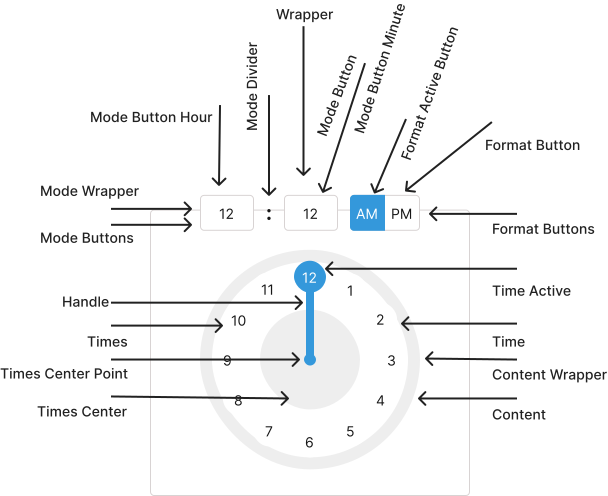
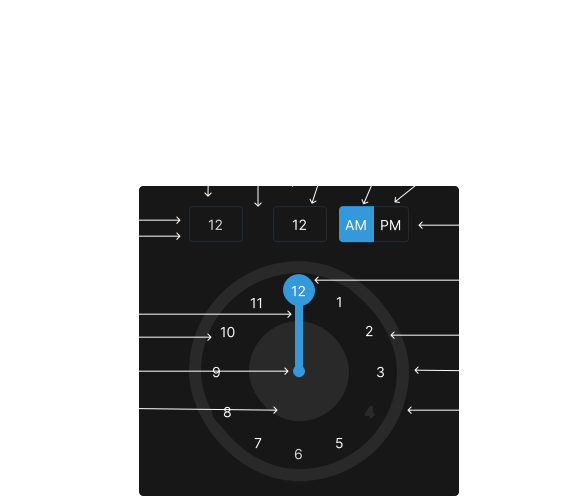
Parts of the Clock
| # | Part | Description |
|---|---|---|
| 2 | Clock Panel | The main area displaying the clock face and time selection interface. |
| 3 | Hour Selector | Allows selecting the hour value. |
| 4 | Minute Selector | Allows selecting the minute value. |
| 5 | AM/PM Toggle (optional) | Toggles between AM and PM when using 12h format. |
| 8 | Icons / Indicators | Visual cues for opening/closing the picker or indicating state. |
| 9 | Focus Ring / Highlight | Shows which part of the picker is currently focused for keyboard navigation. |
How to Use This Anatomy
Each labeled part corresponds to a customizable part of the component. Use the Props page to see which props configure each section, and see the Styling page to learn how to customize colors, sizes, and spacing.
Next Steps
Ready to implement Clock in your application? Explore these resources to get started: